


Someone is impersonating major HR and payroll platforms with “native desktop apps” that do not exist. The download is real and what it installs is real, but it is not what the victim is expecting. The file is a copy of ConnectWise ScreenConnect, a legitimate remote monitoring and management (RMM) tool of the kind IT teams use to administer machines remotely, configured here for silent unattended access and pinned to the attacker’s server. The lure pages were generated with an AI app builder and hosted on Vercel, the payload was served from GitHub Releases, and a single operator ran at least three brand lookalikes at once. The three providers impersonated here offer no desktop app, so there was no real version for the fake to imitate. Whoever installs it is the person who runs payroll, and unattended access to that machine is a path to diverting or draining an entire company’s payroll. If your company runs a cloud payroll or HR platform, the most useful thing you can do this week is check whether yours actually ships one, and tell employees that a download the vendor does not offer is not an upgrade. It is the attack.
The desktop app you downloaded does not exist
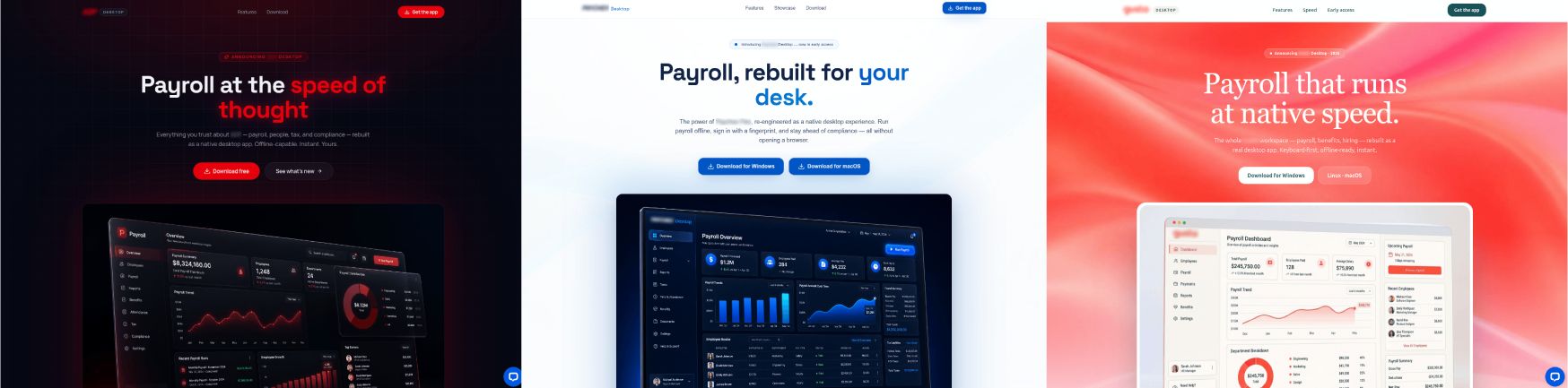
The attack works like this. You get pointed to a faster, “native” version of the payroll or HR portal you already use in a browser. Maybe it arrives as an ad, a search result, or in an email. The page looks right. It has the real logo, real product screenshots, a live-chat bubble in the corner, and one blue Download button. You click, an installer runs, a Microsoft component installs, and then nothing you were promised appears. There is no app. There was never going to be one.
The three providers impersonated in this campaign are all large US payroll and HR platforms, and all three ship their products the same way: as web applications you sign into through a browser, with mobile companion apps. None of them offers a native desktop application for its current platform. We validated with each vendor’s own product pages to be sure. One of them says it plainly, that payroll used to mean installable desktop software and that the cloud replaced it. So the “desktop app” is not a real product the attacker cloned. It is a solution the victim cannot easily check, because there is no obvious legitimate version to compare against.
The download came from GitHub, and the installer was real Microsoft software
lovable.app preview, save that preview to a single HTML file with a browser extension called SavePage WE, and host the file on Vercel. One field in those tags matters most. The SavePage WE snapshot was taken from the operator’s own Lovable preview, not from the real vendor’s website. The tags, as left in the deployed page:savepage-from line is the most interesting part. These pages are not clones of the genuine sites. There was no genuine “desktop app” page to clone, because the product does not exist, so the operator generated one, added in the real brand’s logo and screenshots, and exported it for hosting. That is also why the three lures share a structure but look nothing alike: each was generated fresh, not copied from a common original. They were hosted on Vercel behind that platform’s bot-challenge screen, which did the attacker’s cloaking for them. Automated scanners hit the challenge page and stopped, without accessing the lure, which is why the pages left almost no public scanning footprint while they were live.The Download button did not point at attacker-run hosting. It pointed at a release asset in a GitHub repository. GitHub Releases served as the content-delivery network (CDN) for the payload, which lends the download a trusted domain and free, resilient hosting. Each brand had its own repository under one account, and each repository published the same file under a brand-specific name.
That file is a roughly 64 MB installer built with NSIS, the Nullsoft Scriptable Install System, a common and legitimate Windows installer framework. When it runs it primarily does two things. Sandbox analysis along with static extraction of the installer’s contents shows the sequence clearly. First, visibly, it launches the genuine Microsoft .NET Desktop Runtime 8.0.26 installer, a real, Microsoft-signed component with its own progress window that ends on “Installation was successful.” Second, silently, it runs
msiexec /qn, the quiet no-interface flag, to install ScreenConnect in the background. A standard Windows elevation prompt appears in between. The installer’s own execution log, recovered from the sandbox run, puts the two side by side:/qn on the end, and never shows one.So the only thing the victim sees is a real Microsoft installer finishing normally. The promised payroll app never opens, because it does not exist, and the one window that did appear belonged to Microsoft. Nothing on screen looks like malware.
What installed was silent, attacker-controlled remote access
app.config, verbatim:Every name branded copy of the payload ultimately pointed to the same place. The relay is a self-hosted ScreenConnect server at
jyleatyg[.]com, resolving to 89.213.118[.]127 on port 8041, in Germany. The operator stood up their own server rather than using ConnectWise’s cloud, and left its web console exposed on the internet with the stock theme and no branding. The relay info is baked into the payload in two places and does not change when the wrapper is rebuilt, which makes it a durable indicator. This is the constraint in system.config that fixes every client to that one host and port, with the relay’s public key alongside it (key truncated):One word of caution before going further. The relay port
8041 and the file name ScreenConnect.ClientSetup.msi are ScreenConnect defaults, and both show up in unrelated campaigns run by other operators. They may be worth alerting on in specific cases, but on their own they identify the product, not this actor. That is why the indicators we lean on are the operator’s own: the relay, the client instance id, and the fingerprint of the server’s key.Step back and nothing in this chain is malware in the usual sense. The page was generated by a legitimate AI builder and served by a legitimate host. The download came from a legitimate code platform. The one window the victim saw belonged to Microsoft. The thing that was installed is a legitimate RMM product, doing what it was designed to do, for someone who was never supposed to have it. Defenders have two names for this. Living off the Land (LotL) means using tools that are already trusted on the machine instead of writing custom malware, and here that is ScreenConnect and the Windows installer itself. Living off Trusted Services (LoTS) is its hosting counterpart: putting the infrastructure on platforms with good reputations so the domains and downloads look benign, which is what GitHub and Vercel did for this operator. This campaign does both, end to end. No typical malware, no exploit, no rogue infrastructure. Nothing to see, which was the point.
What this adds to existing ScreenConnect reporting
ScreenConnect abused as a remote-access backdoor, delivered inside a fake software download, has been documented. Microsoft’s threat intelligence team described a campaign in March 2026 that impersonated workplace apps like Teams, Zoom, and Adobe Reader, deploying ScreenConnect and other RMM tools to self-hosted relays from signed installers. Huntress reported in September 2026 on rogue ScreenConnect clients spread through tech-support lures, and that reporting is useful here for a specific reason: the clients it describes use the same default port 8041 and the same ScreenConnect.ClientSetup.msi name we see, run by operators with nothing else in common. Other vendors have documented fake-update and fake-software campaigns pushing ScreenConnect more broadly.
What this campaign adds builds on top of that established backdrop. The lure is not a fake update to a real desktop app. It is a fake desktop app for a service that has none, which complicates the victim’s ability to sanity-check it. The delivery runs through GitHub Releases rather than attacker hosting or email attachments. The pages are not spoofed copies of real ones. They are generated by an AI builder from the real brand’s assets, for a product page that never existed, then cloaked for free behind a hosting provider’s bot screen. And, as the next two sections show, the three brand lures trace to one operator, and that operator was running the same relay a month before any brand appeared. None of this contradicts the prior work. It documents a specific operator and a delivery convention that prior reporting has not.
One live-chat widget tied three lookalikes to a single operator
The three lure sites looked like three different companies. They were not. Each page loaded the same LiveChat account: license id 19290867, with the same organization and client identifiers behind it. A LiveChat license is an account, and the same one embedded across three unrelated brand sites means one operator copied one snippet into all three. The link held up against two other signals: the code author on the release repositories was consistent, and every payload pointed at the one relay.
The evidence supports a single operator behind the three payroll lures. It does not name a person, a company, or a country, and we are not going to infer one from a chat-widget id and a commit history. Each brand was built as its own project in the AI builder, with a distinct page structure, so this was three deliberate builds by one hand rather than one page reskinned three times.
The operator rehearsed for a month before attaching a real brand
The branded pages are not where this all started. The setup came first.

Obtaining a working certificate from a public authority under the “Dennis Miller” name means the threat actor had to clear its identity checks, on a stolen or a shell identity, which is considerably more effort than shipping unsigned code. What the August activity shows is a working relay and a working payload weeks before any brand appeared, which reframes the branded sites as the distribution stage of an operation that was already running. What it does not show is what fronted those August installers. We analyzed the later lure pages, not any earlier ones, so we know they belong to this operation because they connect to the same server, but not how they reached victims. And whatever that effort bought, it did not last. SSL.com revoked the “Dennis Miller” certificate on July 24, 2026, the same day it was issued, for an unspecified reason. The operator signed the August installer two days later anyway, so that build already chained to a burned certificate. By September the payload was unsigned. The identity they went to the trouble of validating did not survive its first day.
On reach, the numbers are modest, but when you consider the potential impact of drained company payroll accounts, they are non-trivial. GitHub reports a download count on each release asset. Across the campaign those counts total 291. That figure is a ceiling, not a victim count, because it includes security researchers, sandboxes, and our own retrieval. We cannot pair it with an infection count, and we are not going to pretend we can. Our visibility is into public impersonation infrastructure, the lure pages and the domains behind them, which is what we detect and take down. It does not extend to endpoints, so we can say the pages were live and served the payload, not how many machines ran it. Thirty-two of seventy engines flagged the file as malicious at the time of analysis. How victims were driven to the pages, whether by ads, poisoned search results, or email, we cannot establish either. The last time Signal & Noise looked at how people arrive at a malicious page, the answer was the first result in a search they trusted. The delivery path here is unconfirmed, but that earlier pattern is the one I would check first.
The same playbook is already pointed at cryptocurrency users
The more recent crypto lures matter mainly for what they are not. They use the same convention, a fake desktop app for a cloud service, built with the same AI-builder tooling and using the same type of ScreenConnect payload, aimed at exchange and wallet users behind eSignature-themed lures. But they are a separate operator cluster. The signer is a different identity on a different certificate authority, the code-host accounts are varied, the live-chat licenses are different, and the working hours differ. The clearest examples are fake desktop apps for DeFi brands, which share the kit and nothing else: a different payload, a different signer, a different code-host account. A shared kit is a convention, not a shared operator, and we treat the two as separate until an operator-specific artifact says otherwise. The point for defenders is only that the desktop-app ploy is not confined to payroll and HR.
What defenders can do this week
For a concrete starting point, hunt for the ScreenConnect client running with an access URL that points somewhere other than a ConnectWise-owned relay. On an infected host the service runs
ScreenConnect.ClientService.exe with parameters of the form ?e=Access&y=Guest&h=<relay-host>&p=<port>&k=<key>, and the service and install directory are named ScreenConnect Client (<hex instance id>). Flag any such client whose relay host you did not deploy, whose user-facing banner and tray icon are turned off, or whose install was launched by msiexec /qn out of a downloaded bundle. The instance id and relay in the list below are specific to this actor. The port and file name are not.For detection and response:
- Hunt on the operator’s own artifacts, not the ScreenConnect defaults. The relay, the client instance id, and the server-key fingerprints in the indicator list below are specific to this actor. Again, port
8041and the setup file name are not. - Treat an unexpected ScreenConnect install as an incident, especially one with the user-facing banner and tray icon disabled and a relay you do not recognize. Legitimate deployments do not usually hide themselves.
- Watch GitHub Releases as a delivery channel, not only phishing links and attachments. A download from a trusted code host is not automatically a safe one.
- Where you can, enforce application control or an allowlist for RMM tools, so an unsanctioned client cannot install and run in the first place. Living-off-the-land tradecraft only works when the trusted tool is allowed to run unchallenged.
The desktop app is actually a dead giveaway
The trick in this campaign is not a clever exploit or a novel payload. It is an offer that sounds plausible and has no real product behind it. When a service you use every day has no desktop version, an offer to download one has nothing legitimate to compare against, and that makes the offer itself the signal. A download prompt for software the vendor never made is not a convenience worth chasing. It is a threat indicator, and it is the one your users can spot without any of the indicators below.
Allure Security protection and mitigation
Allure Security took down the three fake webpages impersonating the payroll software brands, the command-and-control (C2) domain used by the associated ScreenConnect payloads, and the offending GitHub profile and related repositories.
The Allure Security platform protects Enterprise Trust between organizations and their customers, employees, and partners. By combining its intelligent AI core with over a decade of adversary intelligence and 24/7 human expertise, the platform provides the best proactive Trust protection against attackers.
That includes detecting, validating, and removing impersonation infrastructure like this on customers’ behalf, then connecting related threats across channels into broader campaigns to address scams as a whole rather than as isolated incidents.
And in cases like this one, Allure Security also identifies and removes malicious GitHub repositories and other threats that impersonate a company’s brand or legitimate software in order to distribute malware or enable other malicious activity.
Indicators of compromise
Hostile indicators defanged. File hashes and lure domains are withheld from this public post to avoid re-identifying the impersonated providers, and are available to defenders through coordinated channels.
Relay and command-and-control (C2):
jyleatyg[.]com, self-hosted ScreenConnect relay and web console89.213.118[.]127port8041, relay host (AS213250, Germany)- TLS certificate thumbprint
0ee4f56f39fcb4439a3ca30d26df2dab7f123a62
ScreenConnect client (durable, operator-specific):
- Instance id
60f2a85ebfc8ba6f, service nameScreenConnect Client (60f2a85ebfc8ba6f) - Client version
25.3.4.9288(ScreenConnect product version, shared with legitimate installs, not operator-unique) - TLS client fingerprint, JA3
5ce9cdcb77837c5b314809ab59f16eb0(reflects the ScreenConnect client’s TLS stack, product-level rather than operator-unique) - MSI ProductCode
{B292C5EA-BF5F-4280-B056-1670FB10BB1D}, UpgradeCode{D614555B-06A2-6BA6-60F2-A85EBFC8BA6F} - Credential provider CLSID
{6FF59A85-BC37-4CD4-CB52-945CB9728759} - Relay public key, SHA-256 of the SPKI:
0fd8fd4ab25fa87a395d2f0bcb83f012e3992da45346178c91381ea59db3729d - Relay key blob, SHA-256:
f8f026295dbe333af68b2740cb49947137f96c5bb209db5f4c1f3bdaadc87cee
Operator:
- Shared LiveChat license across the three payroll lures:
19290867 - Code-signing certificate (August samples), “Dennis Miller” via SSL.com: thumbprint
82E8827245B34EA8ECEEE4A46C358637C67B09B4, serial60DB069444A15CDC71B10CB7F3753836
Special thanks
What to read next
- Signal & Noise: The Search Result You Shouldn’t Have Clicked (Issue 001) – on malvertising and poisoned search as a delivery.
- Signal & Noise: Phishing Sites Are Outranking Your Login Page (Issue 004) – on search-result poisoning that puts fake pages above the real ones.
- VibeScamming: AI Coding Platforms as Phishing Infrastructure
- Infostealers: The Malware Behind the Credential Economy


